
 Posted by
 Deciding which audio processor to choose has been a tricky part of my cochlear implant journey. In a nutshell, a cochlear implant processor is the external component of a cochlear implant system. It captures sounds from the environment, converts them into digital signals, and sends these signals to the internal implant. The internal implant then stimulates the auditory nerve, creating the sensation of hearing. Your choice of processor depends on the brand of your implant, and in my case, that’s Med-El. Ahead of my audiologist appointment to discuss options, I did my own research to make sure I was well-prepared.
Understanding the Different Processor Styles
With Med-El, I had two main styles of processors to choose from:
- The Med-El Sonnet Processor
- Style: Worn behind the ear, similar to a hearing aid.
- Design: Consists of a small unit that fits comfortably behind the ear with a cable that connects to the transmitter/magnet (to send signals to the internal implant).
- Latest Version: The Sonnet 3.
- The Med-El Rondo Processor
- Style: An all-in-one, single-unit processor worn on the head, just behind the ear.
- Latest Version: The Rondo 3.
When I started researching, the Sonnet 3 had just become available in Spain, but I don’t think it was FDA-approved in the U.S. yet. Meanwhile, the Rondo 3 had been on the market for four years. Unlike some people, who are lucky enough to receive both styles, I could only choose one—so I wanted to make the right decision.
What Mattered Most to Me
The main things I was looking for in a processor were comfort, ease of use, and sound quality. Since I wear glasses a lot—reading glasses for computer work and sunglasses for the bright Spanish sun—I needed something that would be comfortable to wear.
Streaming audio from my phone for aural rehabilitation (activities to help improve my ability to understand and process sounds through the implant) was non-negotiable. However, I didn’t want to sacrifice overall audio quality or find myself stuck with outdated technology.
Researching My Options
The Spanish healthcare system provided my implant, so I wasn’t sure which generation of technology I’d be offered. I prepared myself for the possibility of older models but researched all available options to make an informed decision no matter what.
As part of my research, I explored Med-El’s website and joined the Med-El Hearpeers online community forum. Regarding the latest versions of each processor, I discovered the following:
Sonnet 3
The Sonnet 3 features the latest technology, including the ability to stream directly from my phone. This would be especially helpful during the initial stages of my aural rehabilitation. I also learned that the Sonnet 3 offers flexibility with both disposable and rechargeable batteries. Additionally, it supports longer-lasting Max batteries, which can last up to 17 hours, reducing the frequency of battery changes compared to standard ones. I was intrigued as to whether the Sonnet 3 would be available to me yet and felt like this could be a good choice for me.
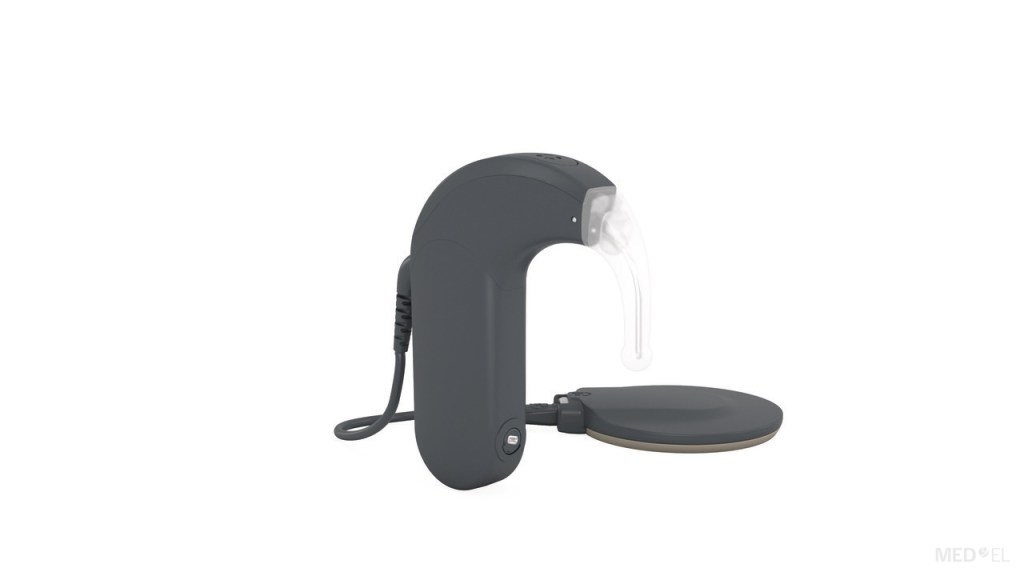
Rondo 3
The Rondo 3, on the other hand, has been available for four years and offers up to 24 hours of battery life. It features wireless charging and a simplified design with fewer parts, making it easy to use. It was a little confusing to understand what intermediate device I would need to be able to connect the processor to my phone for streaming. It seemed like I would need to purchase an AudioLink device (a small remote-control-type accessory), but I wasn’t sure if this was the case.
Hmm, The Sonnet 3 offers direct streaming but relies on batteries, which I’m not a fan of since it means constantly changing them. On the other hand, the Rondo 3 doesn’t have direct streaming, but it does feature wireless charging.
Consulting with an Audiologist Friend
A friend of mine who is an audiologist whose husband has experience with Rondo 2 and Sonnet 2 talked me through the various parts, functionality, streaming capabilities, and charging/battery life options of each device, and also shared information with me about the newest Med-El Processors and relevant accessories, such as those used for streaming.
Real-Life Insights
To dig deeper, I connected with friends and colleagues who had experience with these processors. Many of them used both styles and shared their insights.
Most people who were glasses wearers commented that they didn’t find that glasses were a problem with a behind-the-ear device—some of these people were used to wearing hearing aids behind the ear before getting a cochlear implant.
One person I spoke with shared that they use both types interchangeably and find the sound quality to be the same. In contrast, others preferred a behind-the-ear device, as they were accustomed to the feel of it from years of wearing behind-the-ear hearing aids.
Another person told me that they only use their Rondo because they dislike the sensation of having something behind their ear. “It’s highly personal,” one contact told me, which confirmed what I had already been sensing.
Preparing for the Audiologist Appointment

In preparation for my appointment with the audiologist, I created a table with the information that was important to me. This included microphone directionality, adaptive intelligence, battery life, charging/battery information, streaming capacity, and available apps. This information and more can be found in the Med-El comparison tables. I would take this document with me so that I could refer to it during my consultation, and ask any questions I had.
Consulting with the Audiologist
Three weeks after my surgery, I met with my audiologist who will program my implant, to review the options. He brought brochures for the Rondo 2, Sonnet 2, and Rondo 3 and explained that the Sonnet 3 was also available, even though he didn’t yet have a brochure for it. He also had a dummy-style Sonnet and Rondo, so I could try them on for size and fit.
Weighing the Costs and Technology Options
To my surprise, I had access to the latest technology, but there was a catch: the Sonnet 3 and Rondo 3 required an out-of-pocket cost, while older models like the Rondo 2 and Sonnet 2 were fully covered by the Spanish healthcare system. The cost of the newer models was about the same as what I would pay for a standard hearing aid.
I was concerned that choosing the older technology would leave me with outdated equipment in 7 years (the typical lifespan of the processors, according to the specialist). For this reason, I ruled out the Rondo 2, which lacked the streaming capability essential for my rehabilitation, as well as the Sonnet 2.
First Impressions: Sonnet 3
I was excited that the Sonnet 3 was available to me! However, when I tried on the dummy Sonnet processor, I found it a bit uncomfortable, and I wasn’t sure how well I would adjust to the behind-the-ear design. It felt bulky and awkward, especially with my glasses. Is this something I would get used to? I wondered.
First Impressions: Rondo 3
I then tried the dummy Rondo processor, which felt much more comfortable, even though there was still swelling in the area where the magnet attached. I was able to put on my glasses easily, without worrying about accidentally knocking the processor off.
Influence of Social Media
I had always assumed I would choose a behind-the-ear device, but the Rondo felt more comfortable. Many people I follow on social media use a behind-the-ear option, though I know that shouldn’t influence my decision. I’m not sure why I started fixating on this, but I found myself wondering—What, if anything, would I be missing out on by choosing an on-the-head device over a behind-the-ear one?
Managing Expectations for Activation
As always, the audiologist made sure my expectations for activation and the experience of hearing through the implant were realistic. He reminded me that my strong right ear could make rehabilitation more challenging. Even if I block my hearing ear, I’ll still pick up environmental sounds, making it harder to focus entirely on my implanted ear—a point that’s been emphasized in every appointment. This is why being able to stream audio is so important for my aural rehabilitation.
He also noted that since my hearing loss occurred eight years ago, adapting might be difficult. With zero word recognition even at full volume, my right ear hasn’t been “hearing” for eight years, which could impact how well I adjust to the bionic ear. This, too, is a point that’s been consistently emphasized in every consultation. Even with these factors, I remained optimistic about a positive outcome.
Next, I needed to call Med-El to confirm my choice of processor.
A Conversation with Med-El
Three days following my consultation with the audiologist, I spoke on the phone with a Med-El representative. I was able to speak to someone in English, which was super helpful.
Audio Quality Concerns
I asked her my question: What will I be missing out on in terms of audio quality by wearing something that isn’t behind the ear? She assured me that the technology in both the Sonnet 3 and the Rondo 3 is excellent, with users satisfied with both devices. The main difference is personal preference of style and features. This was backed up by my previous conversations with Med-El users of the 2 types of processors.
I thought back to sitting in the audiologist’s chair and the uncertainty about the feeling of the behind-the-ear dummy Sonnet processor and my glasses behind my ears. Maybe I would get used to this, but I didn’t have the luxury of being able to ‘try before I buy’. All I have to go on is how the processors felt during my consultation with the audiologist.
AudioLink or AudioStream: What Do I Need for Rondo 3 Smartphone Streaming?
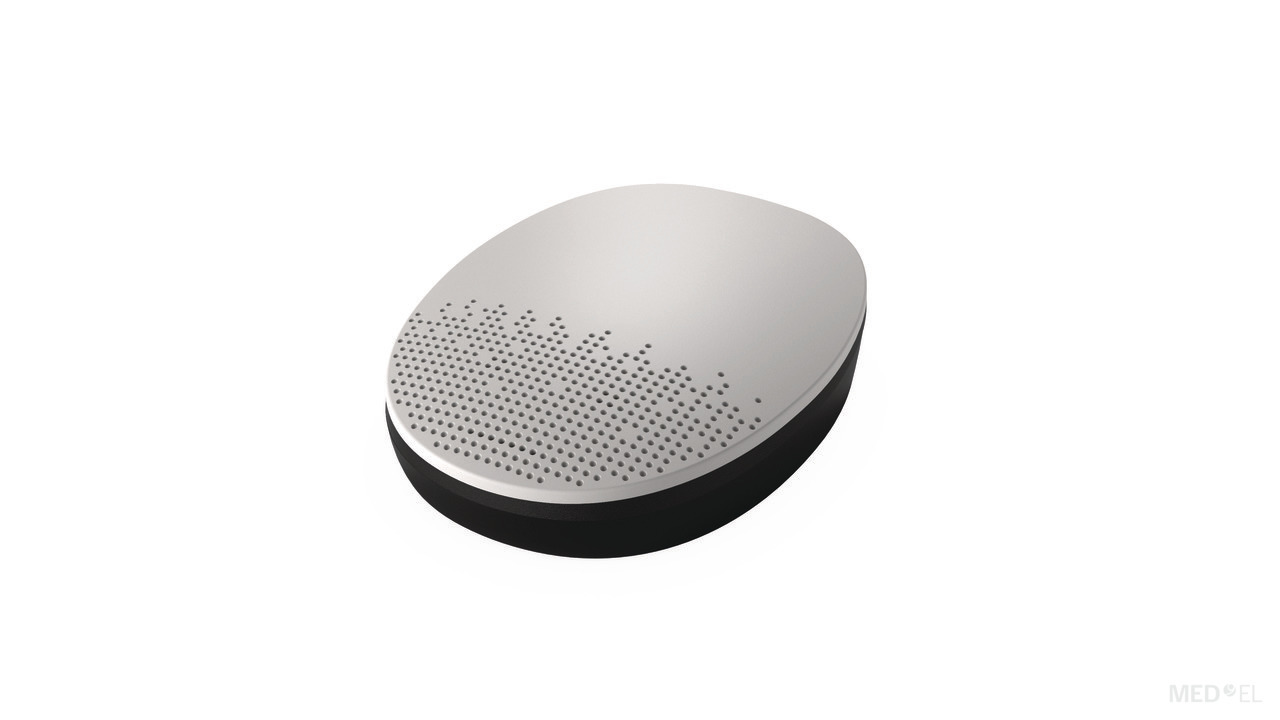
I then asked if I would need the AudioLink device to connect my phone to the Rondo 3 processor for rehabilitation through apps or streaming music. She said, it wasn’t necessary for this, and that I would just need to connect the AudioStream adapter (a small wireless pendrive-like device that slots into the Rondo 3), that comes in the activation kit. The AudioStream is compatible with iOS and Android devices that support Made for iPhone (MFi) and Audio Streaming for Hearing Aids (ASHA) technology (more compatibility information can be found here.) She explained that I would only need the AudioLink device—which would have to be purchased separately—for more complex tasks (like using it as a remote microphone) or to connect to media that are not compatible with hearing aids and cochlear implants.
This was a relief, and I couldn’t help but think, “Music to my ears”—pardon the pun! I had originally thought that if I chose the Rondo 3, I would need to buy the AudioLink for rehabilitation exercises on my smartphone, but it turns out that’s not the case. Just to double-check, (ever the cautious consumer), I messaged Med-El on Instagram messenger, and they confirmed this.
Choosing the Colour of My Processor
I was informed that the only colour available to me for the Rondo 3 was black, and any other covers could be purchased separately. The Sonnet 3, on the other hand, offered more customization, allowing me to choose different colours for each component.
Next Steps
Following the call, the Med-El rep sent me information on the cost and payment details, via email, for each device. The next step would be to make my decision, pay the fee, and notify them once I’d done so, letting them know my activation date so that they could send the processor to the hospital in time for the big day.
My Decision
After a lot of back and forth, I chose… the Rondo 3!
Why? It just felt more comfortable and practical for me. While I had always imagined I’d go for a behind-the-ear processor, trying the Rondo changed my perspective. The wireless charging and simplicity outweighed the lack of direct streaming, especially since the AudioStream adapter would let me easily stream from my phone when doing aural rehabilitation. I also believe that the user-friendly design of this type of processor will make the transition to using hearing technology much smoother.

I’ll start with a black cover but plan to add colourful designs in the future. I love talking about my hearing journey, and I’m looking forward to showing off my processor when the mood strikes!
Resources That Helped Me
Processors comparison: https://www.medel.com/hearing-solutions/cochlear-implants/audio-processor-comparison
Connectivity features: https://www.medel.com/hearing-solutions/accessories/connectivity
The next step is activation day – roll on December 18th!
 My Hearing Loss Story
Hi. Only 8 more days until activation! Appreciate the very detailed review of your options and the thought process that lead you to your choice. I’m a bit confused about the audio stream adapter. Can you leave it plugged in to your processor all the time? Curious why they would not just build in blue tooth capability? My aids do this and I can’t imagine not having this feature.
I hope your activation goes well and look forward to your sharing the details.
Butch
LikeLiked by 1 person
Hi Butch, Thanks for the comment! I’m not sure it would be comfortable/practical to leave the AudioStream plugged in to the processor all the time. I’ll know soon enough! I think that just as hearing aid technology had to evolve to get to where it is today (direct streaming capabilities, artificial intelligence features, etc.) cochlear implants are also evolving. The new Sonnet 3 has direct streaming, so technology is going in that direction. Thank you for your kind wishes! I’ll write a post shortly after activation. All the best!
LikeLike
Hello there Carly. I have the Rondo 3 now – I’d had my Sonnet for six years last December when it was time for the NHS to replace it, with a choice of Sonnet or Rondo. I love it that the Rondo doesn’t need batteries. The overnight charger works brilliantly and I get about 19 hours of charge out of it (tested when I once had to take my husband to A&E!) I bought a portable power bank in case of holiday emergencies, just in case. I love the colourful covers, which need replacing every three months so you can change your design. I’m currently using the real bright ‘Watercolours’ one. The sound quality is equal to the Sonnet. In the NHS I got the Rondo without extra charge, and the Audiolink kit as well, which is great, but would have to pay for the AudioStream device. I haven’t done that yet so will watch your blog to see how you find it.
One small thing, someone recommended that I attach the Rondo to my hair with the little clip that’s provided, and I’m glad I took that advice. If you accidentally knock the Rondo it will fall off, whereas the Sonnet would probably still be hanging from your ear….
So much detail! You’ll be fine!! Good choice!!!
LikeLiked by 1 person
Hi Vera,
Just the encouragement I needed to read! Thank you for sharing your experience of the Rondo 3 – I didn’t know you had this processor! Yes, I like the idea of not having to worry about batteries, and since I am not used to wearing a hearing device behind my ear, I think the off-ear style will be easier for me to get used to. Thank you for the tip about using the clip – I am a little concerned about knocking off the processor, particularly in the beginning when I am getting used to wearing it. I have also seen some cool ear cuffs that attach to the processor with a chain, which I’m thinking of treating myself to after Christmas 🙂 There are lots of nice designs for the cover too. I just looked at the watercolour one you are currently wearing – love it!
Thanks for the positivity, Vera!
Wishing you and your family a very happy Christmas!
Carly x
LikeLike